


Loading Screen (DebuX)
Debux
- ESX
- Standalone
- QBCore
- vRP
Description
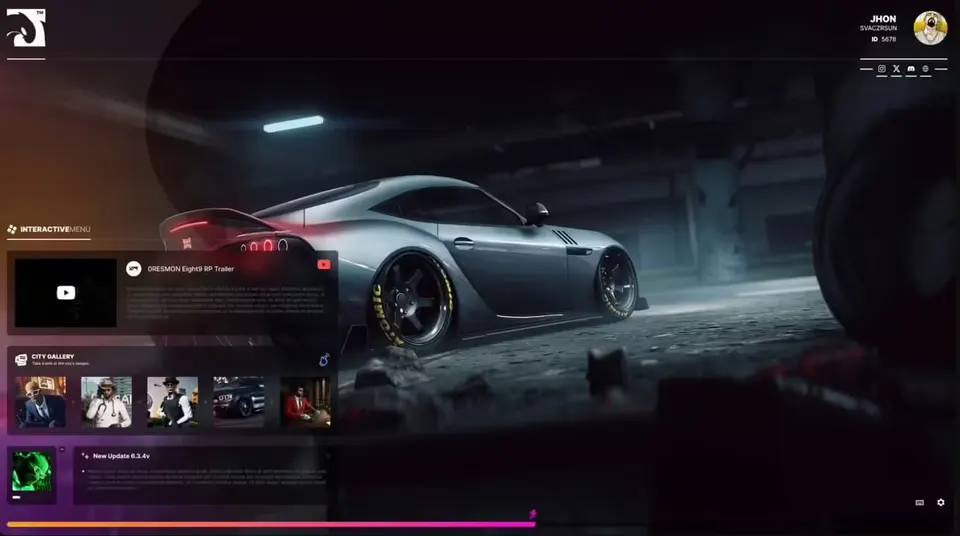
A FiveM loading screen with a minigame built in, so your players have something to do while the server loads.
Check out the videoFeatures
- Minigame inside the loading screen
- Background music included (
web/music.mp3), which you can replace with your own track - Icon graphics for Discord, TeamSpeak, website, staff, social links, sound and video
- Background image, loading bar graphic and custom font included in the
webfolder, so you can swap in your own branding - Mouse cursor enabled on the loading screen
Requirements
- The manifest declares no framework or resource dependencies (HTML/CSS/JS loading screen with a small client script)
Installation
- Copy the
BakiTelli-loadingscreenfolder into your resources folder. - Replace the images, music and texts in the
webfolder with your own. - Add
ensure BakiTelli-loadingscreento your server.cfg.
Details
- Frameworks
- ESX, Standalone, QBCore, vRP
- File size
- 8.8 MB
- Creator
- Debux
- Updated
- Oct 14, 2026
Installation
- Unzip the download into your server's resources folder.
- Add these lines to server.cfg, in this order:
ensure BakiTelli-loadingscreen
Checked: the one resource of this download.
From a static check of the files by the RPScripts Lab. It is not a test that your server starts.
Loading Screen (DebuX)
$6.99€6.99£5.99A$10.99R$35.99CHF 5.99¥1,110Related resources

Jakrino Loading Screen
Jakrino
izzy Loading Screen v7
Izzy Scripts
- ESX
- QBCore
0R-LOADINGSCREEN V2
0Resmon


Can't find the exact script? Generate it.
Describe a custom script. 3 free credits per day, up to 15 per calendar month; no card needed.