
RPScripts AI · Free to start
FiveM AI Script Generator
Describe the script your server needs. RPScripts AI writes the Lua, NUI and fxmanifest for QBCore, Qbox, ESX or standalone, checks the syntax of every file and gives you a resource to review and test.
Start from a template
3 free credits per day, up to 15 per calendar month · No card needed · Email sign-in
Explore example projectsHow it works
RPScripts AI is a FiveM script generator in your browser. It turns a plain description into a complete resource and checks it while it writes.
Describe your script
Write what the script should do, in your own words and in any language. Pick QBCore, Qbox, ESX or standalone, or upload an existing resource as a ZIP.
Watch it build
RPScripts AI writes fxmanifest.lua, config, client and server files and an NUI when needed. After every file it checks the Lua syntax and the manifest and fixes what it finds.
Refine and download
Ask for changes in the chat, edit the code yourself, preview the NUI and restore older versions. Download the resource as a ZIP and test it on your dev server.
Example projects you can open and change
Complete resources with their prompts. Open one in the editor and keep building with your own prompts.
Recorded AI runs are marked with their actual credit use. Other examples are curated starters. All need review and testing on your development server.
01Standalone
Standalone server rules board
A small standalone /rules panel. Configurable rules, Escape and Close controls, with focus released on close and resource stop.
Recorded AI run · 0.6 credits · 2026-10-13
View prompt, files and code
Prompt Create a standalone FiveM /rules command. Show a small NUI panel with three server rules from config.lua. Escape and a Close button dismiss it. Release NUI focus on close and resource stop. No database, payments or external HTTP requests. Include fxmanifest.lua and explain how to test it.
Files
- config.lua
- fxmanifest.lua
- client/
- main.lua
- html/
- index.html
- script.js
- style.css
- locales/
- en.lua
html/index.html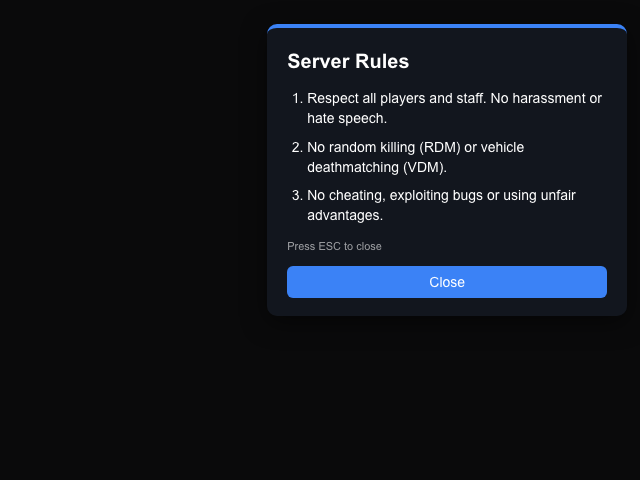
Browser NUI render with simulated messages. In-game behavior has not been verified.
client/main.lualocal function openRules() if isOpen then return end isOpen = true SetNuiFocus(true, true) SendNUIMessage({ action = 'open', title = Locale.title, close = Locale.close, hint = Locale.hint, rules = Config.Rules, layout = Config.Layout.panel, theme = Config.Theme.name }) end02QBCore
QBCore garage with impound
Store and retrieve owned vehicles at garages and recover lost ones from the impound for a fee. Ownership, distance and payment are checked on the server.
View prompt, files and code
Prompt Create a garage script for QBCore: players store and retrieve their owned vehicles at marked garages through an ox_lib menu, with an impound lot that charges a retrieval fee. Garage locations and fees in config.
Files
- config.lua
- fxmanifest.lua
- client/
- main.lua
- locales/
- en.lua
- server/
- main.lua
server/main.lualocal function takeFromImpound(player, cid, plate) local row = MySQL.single.await('SELECT state FROM player_vehicles WHERE plate = ? AND citizenid = ?', { plate, cid }) if not row or row.state == GARAGED or inWorld(plate) then return false, 'vehicle_out' end local fee = Config.Impound.fee local account = Config.PayFrom if player.PlayerData.money[account] < fee then account = account == 'bank' and 'cash' or 'bank' end if not player.Functions.RemoveMoney(account, fee, 'garage-impound-fee') then return false, 'no_money' end -- An impounded vehicle is claimed atomically; a lost "out" one stays out (the busy lock guards it). if row.state == IMPOUNDED then local changed = MySQL.update.await( 'UPDATE player_vehicles SET state = ? WHERE plate = ? AND citizenid = ? AND state = ?', { OUT, plate, cid, IMPOUNDED } ) if changed ~= 1 then player.Functions.AddMoney(account, fee, 'garage-impound-refund') return false, 'vehicle_out' end end return true, nil, { fee = fee, account = account } end03ESX
ESX delivery job with van spawn
Clock in at the depot, get a van spawned by the server and deliver to random drop-offs. Pay, distance and timing are checked on the server.
View prompt, files and code
Prompt Create a delivery job for ESX: players clock in at a depot, a work van spawns, they deliver packages to random drop-off points marked with blips and get paid per delivery. The van despawns when the shift ends.
Files
- config.lua
- fxmanifest.lua
- client/
- main.lua
- locales/
- en.lua
- server/
- main.lua
server/main.luaESX.RegisterServerCallback('rpc_delivery:deliver', function(src, cb) local shift = shifts[src] local xPlayer = ESX.GetPlayerFromId(src) if not shift or not shift.van or not xPlayer then return cb(false) end local drop = Config.DropOffs[shift.route[shift.step]] if not drop then return cb(false) end local ped = GetPlayerPed(src) if #(GetEntityCoords(ped) - drop) > Config.DropRadius then return cb(false) end if not DoesEntityExist(shift.van) or #(GetEntityCoords(shift.van) - drop) > 40.0 then return cb(false, 'need_van') end if os.time() - shift.lastDrop < Config.MinSecondsBetweenDrops then return cb(false, 'too_fast') end local pay = Config.PayPerDelivery + math.random(Config.Bonus.min, Config.Bonus.max) xPlayer.addAccountMoney(Config.PayAccount, pay, 'Delivery job') shift.delivered = shift.delivered + 1 shift.step = shift.step + 1 shift.lastDrop = os.time() cb(true, pay, Config.DropOffs[shift.route[shift.step]]) end)04Qbox
Qbox NUI shop
An NUI shop with categories, a cart and payment by cash or card. Prices come from the server config, items go through ox_inventory.
View prompt, files and code
Prompt Create an NUI shop for Qbox: a clean shop menu that opens at configurable store locations, with item categories, a cart and payment by cash or bank. Items and prices in config, items through ox_inventory.
Files
- config.lua
- fxmanifest.lua
- client/
- main.lua
- html/
- app.js
- index.html
- style.css
- locales/
- en.lua
- server/
- main.lua
html/index.html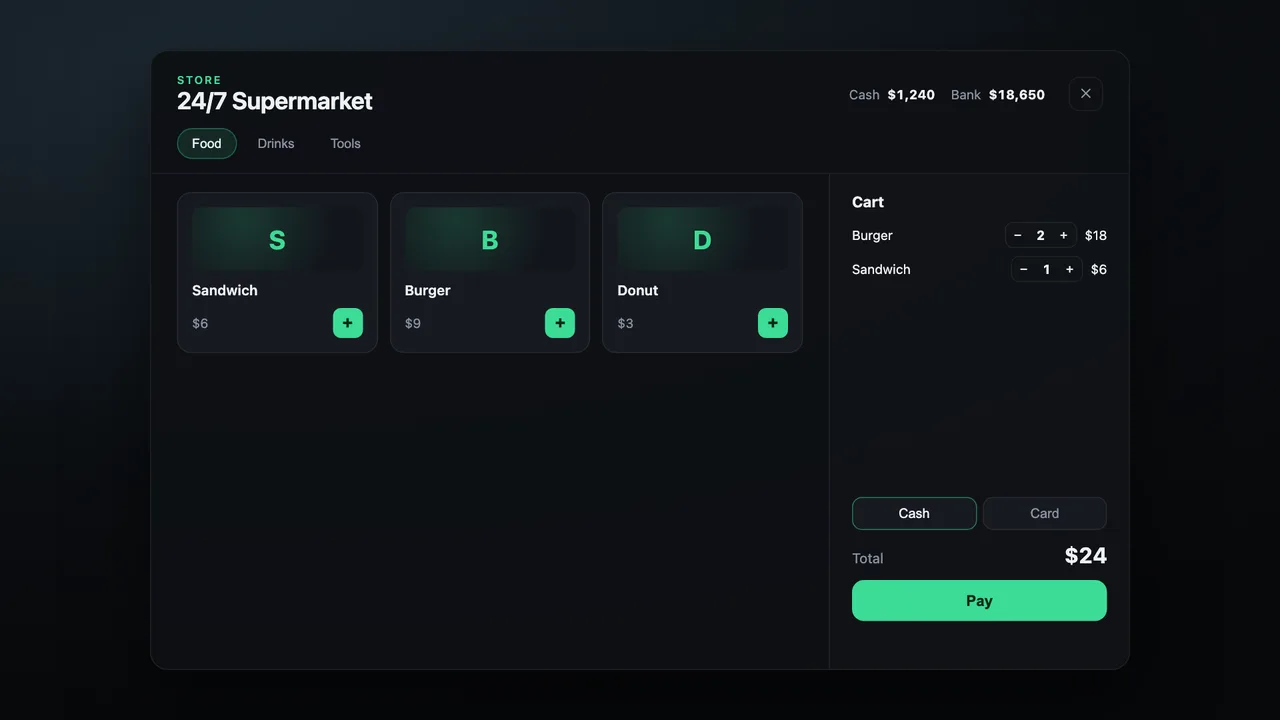 server/main.lua
-- Only names and counts come from the client; prices are always looked up here. local catalog, lines, total = prices[shop.catalog], {}, 0 for name, count in pairs(cart) do count = math.floor(tonumber(count) or 0) local price = type(name) == 'string' and catalog[name] if price and count > 0 then count = math.min(count, Config.MaxPerItem) lines[#lines + 1] = { name = name, count = count } total = total + price * count end end if #lines == 0 then return { ok = false, reason = 'empty_cart' } end05Standalone
Standalone admin menu
An NUI staff panel with a player list, teleport, heal, revive, freeze, spectate and kick, restricted by ACE permission and logged.
View prompt, files and code
Prompt Create a standalone admin menu: an NUI panel for staff with a player list and actions (teleport, bring, heal, revive, freeze, spectate, kick), restricted by ace permissions, and every action logged.
Files
- config.lua
- fxmanifest.lua
- client/
- main.lua
- html/
- app.js
- index.html
- style.css
- locales/
- en.lua
- server/
- main.lua
html/index.html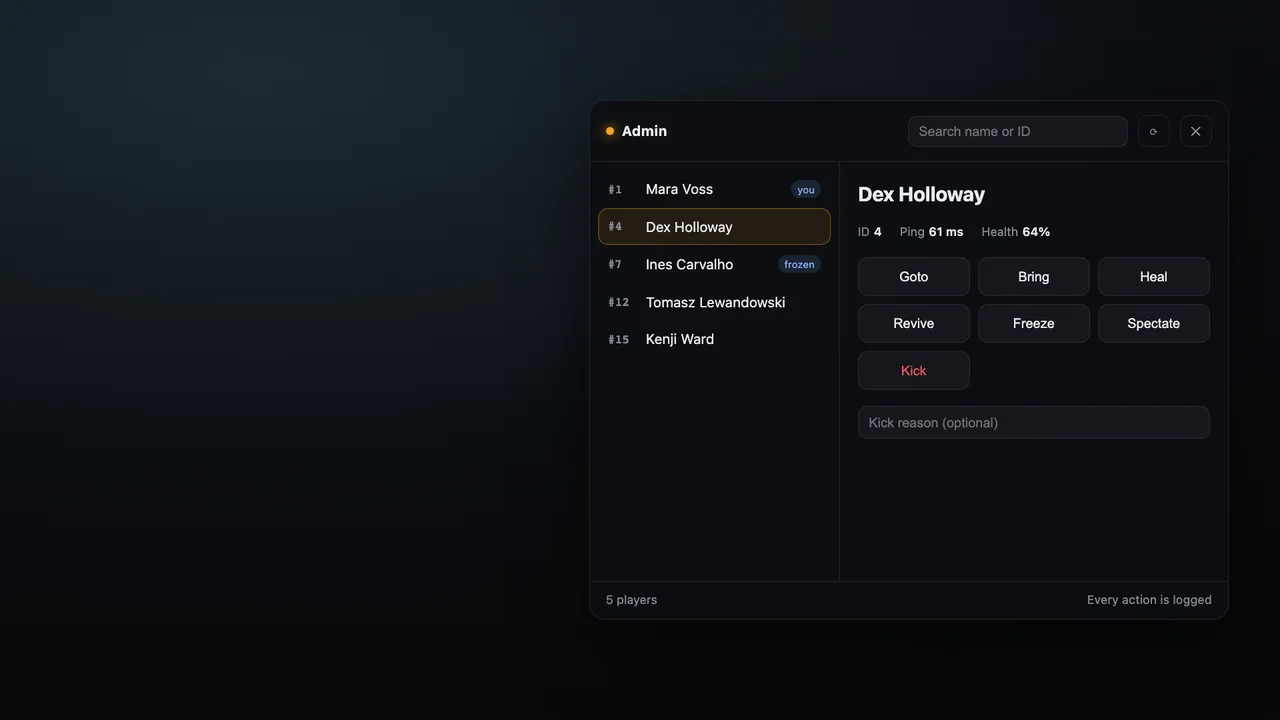 server/main.lua
RegisterNetEvent('rpc_admin:server:action', function(action, targetId, reason) local src = source -- Everything is re-checked here: the NUI and the client are not trusted. if not isStaff(src) or not allowedActions[action] or not handlers[action] then return end local target = tonumber(targetId) if not target or GetPlayerPing(target) == 0 then return TriggerClientEvent('rpc_admin:client:notify', src, Locale.player_gone) end if action == 'kick' then reason = type(reason) == 'string' and reason:sub(1, 120) or '' if reason == '' then reason = Locale.default_reason end end local detail = handlers[action](src, target, reason) log(src, action, target, detail) TriggerClientEvent('rpc_admin:client:notify', src, Locale.done:format(action, GetPlayerName(target) or target)) TriggerClientEvent('rpc_admin:client:players', src, playerList()) end)06QBCore
ox_target fuel station
Target a pump with ox_target, refuel with a progress bar, pay per litre on the server and see a small fuel HUD.
View prompt, files and code
Prompt Create a fuel station script using ox_target for QBCore: target a pump to refuel the closest vehicle, price per liter in config, a progress bar while refueling and a small fuel HUD.
Files
- config.lua
- fxmanifest.lua
- client/
- main.lua
- locales/
- en.lua
- server/
- main.lua
server/main.lualib.callback.register('rpc_fuel:server:pay', function(src, netId, requested) local player = QBCore.Functions.GetPlayer(src) local veh, reason = validVehicle(src, netId) if not player or not veh then return { ok = false, reason = reason or 'no_vehicle' } end local liters = math.floor(tonumber(requested) or 0) if liters < 1 then return { ok = false, reason = 'full' } end liters = math.min(liters, Config.TankSize) local price = liters * Config.PricePerLiter for _, account in ipairs(Config.PayFrom) do if player.PlayerData.money[account] >= price and player.Functions.RemoveMoney(account, price, 'fuel') then return { ok = true, liters = liters, price = price } end end return { ok = false, reason = 'no_money', price = price } end)07Standalone
HUD starter
Status bars, a speedometer with fuel and gear, layout and colours in config. Values reach the page only when they change, the HUD hides in the pause menu, and hunger and thirst come from QBCore or Qbox metadata when the server has them.
View prompt, files and code
Prompt Create a player HUD: health, armor, hunger and thirst bars, and a speedometer with fuel and gear while driving. Hide it in the pause menu, update only on change, positions, colors and km/h or mph in config. Hunger and thirst from QBCore or Qbox metadata when available.
Files
- config.lua
- fxmanifest.lua
- client/
- framework.lua
- main.lua
- html/
- app.js
- index.html
- style.css
html/index.html client/main.lua
local function update() local changed, any = {}, false local function put(key, value) if last[key] ~= value then changed[key], last[key], any = value, value, true end end for key, value in pairs(readState()) do put(key, value) end -- Hidden in the pause menu and wherever the game hides its own HUD (cutscenes, DisplayHud(false)). put('show', enabled and not IsPauseMenuActive() and not IsHudHidden()) if not ready then SendNUIMessage({ action = 'init', settings = SETTINGS, data = last }) elseif any then SendNUIMessage({ action = 'update', data = changed }) end end08Standalone
Phone starter
An NUI phone with a home screen and working clock, calculator, notes and settings apps. Notes stay on the player's PC, ESC closes it, theme and frame size in config, and name and job show when QBCore, Qbox or ESX is running.
View prompt, files and code
Prompt Create a phone as an NUI page: open and close it with a rebindable key or /phone, ESC closes, home screen with an app grid, and working clock, calculator, notes and settings apps. Notes saved per player with client KVP, dark or light mode in settings, accent colour, wallpaper and phone size/position in config. Show name and job when QBCore, Qbox or ESX is running.
Files
- config.lua
- fxmanifest.lua
- client/
- framework.lua
- main.lua
- html/
- app.js
- index.html
- style.css
html/index.html client/main.lua
RegisterNUICallback('saveNote', function(data, cb) local text = type(data) == 'table' and type(data.text) == 'string' and data.text or '' if not utf8.len(text) or not text:find('%S') then return cb({ ok = false, notes = notes }) end local cut = utf8.offset(text, Config.Notes.maxLength + 1) if cut then text = text:sub(1, cut - 1) end local index = type(data.id) == 'number' and findNote(data.id) local note if index then note = table.remove(notes, index) elseif #notes >= Config.Notes.max then return cb({ ok = false, error = 'full', notes = notes }) else local id = 0 for _, other in ipairs(notes) do id = math.max(id, other.id) end note = { id = id + 1 } end note.text = text table.insert(notes, 1, note) -- the latest edit first save('notes', notes) cb({ ok = true, id = note.id, notes = notes })
Built for FiveM, not for a chat window
Framework conventions
Uses the exports and patterns of QBCore, Qbox and ESX, plus ox_lib, ox_target, ox_inventory and oxmysql where they fit.
Server-side as the rule
RPScripts AI is instructed to keep money, items and permissions on the server and to validate client events. Check the result before you go live.
Checked while it writes
Every Lua file is parsed for syntax errors and every script must be listed in fxmanifest.lua. Problems go straight back to the AI to fix.
Live NUI preview
HTML, CSS and JavaScript menus render in a sandboxed preview, so you see the interface before you start your server.
Every version saved
Each AI change becomes a version. Compare the diff, restore an older one or download any version as a ZIP.
Readable code, no lock-in
Plain, unencrypted Lua with a config.lua and locale files. No escrow, no obfuscation, no hidden HTTP calls.
RPScripts AI vs. ChatGPT vs. buying a script
All three can get a script onto your server. They differ in how much you assemble yourself, how freely you can change it and what you pay.
| Aspect | RPScripts AI | ChatGPT | Buying a script |
|---|---|---|---|
| Best for | Custom scripts that fit your server exactly | General coding, questions and explanations | Large, polished systems like phones, housing or MDTs |
| What you get | A full resource: manifest, config, client, server and NUI | Code in chat or a workspace; exports depend on the tools you use | A finished resource from its creator |
| FiveM checks | Lua syntax and fxmanifest checked after every file | Run FiveM-specific checks with your own tooling | Check the creator’s stated test coverage |
| Changes | Ask in the chat or edit the code, every version is kept | Conversation or workspace edits, depending on the tool | Config options; the code is often encrypted (escrow) |
| Updates and support | You test and maintain the code | You test and maintain the code | Updates and support depend on the product |
| Cost | 3 free credits/day, up to 15/calendar month; plans from €19/month | Free and paid limits depend on the selected plan and tools | A one-time price per script |
Need a large system with updates and support instead? Browse QBCore scripts, ESX scripts or everything in the shop.
Pricing
Start free with 3 credits a day, up to 15 a month. A typical script uses about 3 credits. Paid plans add monthly credits on top of the daily ones.
Compare all plansQuestions about the FiveM AI script generator
What is RPScripts AI?
RPScripts AI is a FiveM script generator that runs in your browser. You describe a resource in plain words, and it writes the fxmanifest.lua, config, client and server Lua and, when needed, an NUI interface. While it works, it checks every file for Lua syntax errors and missing manifest entries. It runs on Anthropic's Claude Sonnet model and is made by RPScripts, a shop for FiveM resources.
Is the FiveM AI script generator free?
Yes, you can start for free. Every account gets 3 credits per day, up to 15 credits per calendar month, without a payment card. A typical script uses about 3 credits, small changes use less. If you need more, the paid plans add monthly credits on top of the daily ones, starting at €19 per month. All prices are in euros and include VAT.
Which frameworks does it support?
RPScripts AI writes scripts for QBCore, Qbox, ESX and standalone servers. You pick the framework before you start, and it follows that framework's exports and conventions, for example player objects, money functions and callbacks. It also uses common resources such as ox_lib, ox_target, ox_inventory and oxmysql where they fit. Mention other dependencies your server uses in your prompt.
Can it edit or fix an existing script?
Yes. Upload your resource as a ZIP file of up to 5 MB and describe what you want to change, for example a new feature, a bug fix or a translation. RPScripts AI reads the files, edits only what is needed and saves the result as a new version, so you can compare the changes or go back to the old code.
Are AI-generated FiveM scripts safe to run?
RPScripts AI is instructed to keep money, items and permissions on the server, to validate every client event and to never add obfuscated code, backdoors or hidden HTTP requests. The result is plain, readable Lua. AI can still make mistakes, so read the code, test every script on a development server first and only then move it to your live server.
How is it different from ChatGPT?
General AI assistants can also write and edit files. RPScripts AI combines a FiveM resource tree, fxmanifest checks, Lua diagnostics, NUI preview and version history in one workflow. You can inspect each change and export the resource as a ZIP. Either approach still needs review and testing on your development server.
Can I download and change the code?
Yes. Every version of your project can be downloaded as a ZIP and dropped into your server's resources folder. The code is not encrypted and not tied to RPScripts, so you can edit it in any editor, keep it in your own Git repository and continue working on it with or without RPScripts AI.
How do I install a generated script?
Download the ZIP, unpack it into your server's resources folder and add ensure followed by the resource name to your server.cfg. Make sure the dependencies listed in fxmanifest.lua, such as ox_lib or oxmysql, are installed and start before it. Then restart the server, or run refresh and ensure in the server console, and test the script in game.
Should I generate a script or buy one?
Generate a script when you need something specific to your server: a job, a shop, a garage change or an admin tool that nobody sells in exactly that form. Buy one when you want a large, finished system such as a phone, housing or an MDT that comes with updates and support from its creator. Many servers use both.
Guides for working with AI on FiveM
Whether you use RPScripts AI or another tool: how to prompt, check and test AI-written FiveM code before it reaches your players.
From prompt to tested ZIP (English)Describe your framework, review the Lua and test the export step by step.