


Free starter · source files included
Free FiveM server rules script
Give players a /rules command that opens your server rules in a small NUI panel. Download the existing RPScripts starter, edit the rules and test it on your server.
- 7 source files
- No framework or database dependency
No account, payment or AI credits needed for this download.
What the script does
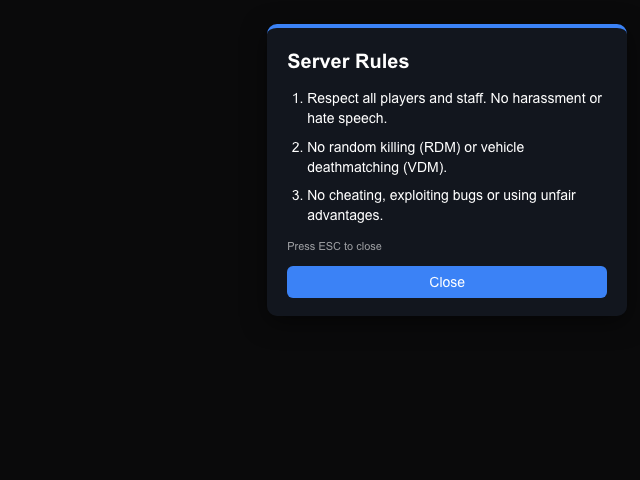
The /rules command opens a panel with editable rules. Players close it with Escape or the Close button. The client code releases NUI focus when the panel closes and when the resource stops.
This is a small display-only starter. It does not record rule acceptance, enforce rules, manage permissions or replace moderation tools.
Install it on a test server
- Extract the ZIP into resources/[local]/ so the manifest is at resources/[local]/rules_board/fxmanifest.lua. Avoid nesting another rules_board folder inside it.
- Edit Config.Rules in config.lua and the panel labels in locales/en.lua. If another resource already uses /rules, change Config.Command before starting this one.
- Add the line below to server.cfg, then restart your test server. Keep the resource folder named rules_board so the command matches.
ensure rules_board - Connect with FiveM and run /rules. Check every rule, close with the button, reopen and close with Escape. Confirm movement and mouse control return, then check the F8 and server consoles for errors. Also test stopping and restarting the resource.
Make it your own
Config.Command- The command name without the slash. The default is rules.
Config.Rules- The list of rule strings shown in the panel. Replace the three example rules with your own.
Config.Layout.panel- Panel anchor and x/y offsets in percent. The default places it at the top right.
Config.Theme.name- Choose blue, red, green, orange or purple, or supply a CSS color.
locales/en.lua- The panel title, Close button and Escape hint. Translate these for your players.
Inspect the source before you install
These are the exact seven files in the ZIP. The Lua, HTML, CSS and JavaScript are readable and editable. Opening a file here does not execute it.
config.lua
Config = {}

Config.Command = 'rules'

-- Exactly three rules shown in the panel
Config.Rules = {
    'Respect all players and staff. No harassment or hate speech.',
    'No random killing (RDM) or vehicle deathmatching (VDM).',
    'No cheating, exploiting bugs or using unfair advantages.'
}

Config.Layout = { panel = { anchor = 'top-right', x = 2.0, y = 3.0 } }
Config.Theme = { name = 'blue' }
Config.SpeedUnit = 'kmh'
fxmanifest.lua
fx_version 'cerulean'
game 'gta5'
lua54 'yes'

name 'rules_board'
description 'Standalone /rules command with NUI panel'
version '1.0.0'

shared_scripts {
    'config.lua',
    'locales/en.lua'
}

client_script 'client/main.lua'

ui_page 'html/index.html'

files {
    'html/index.html',
    'html/style.css',
    'html/script.js'
}
html/script.js
const panel = document.getElementById('panel');
const colors = { blue: '#3b82f6', red: '#ef4444', green: '#22c55e', orange: '#f97316', purple: '#a855f7' };

function post(name, data) {
    return fetch(`https://${GetParentResourceName()}/${name}`, {
        method: 'POST',
        body: JSON.stringify(data || {})
    }).catch(() => {});
}

function place(layout) {
    panel.style.top = panel.style.bottom = panel.style.left = panel.style.right = 'auto';
    panel.style.transform = '';
    const a = (layout && layout.anchor) || 'top-right';
    const x = ((layout && layout.x) || 0) + '%';
    const y = ((layout && layout.y) || 0) + '%';
    let tx = '', ty = '';
    if (a.includes('top')) panel.style.top = y;
    else if (a.includes('bottom')) panel.style.bottom = y;
    else { panel.style.top = '50%'; ty = 'translateY(-50%)'; }
    if (a.includes('left')) panel.style.left = x;
    else if (a.includes('right')) panel.style.right = x;
    else { panel.style.left = '50%'; tx = 'translateX(-50%)'; }
    panel.style.transform = (tx + ' ' + ty).trim();
}

window.addEventListener('message', (e) => {
    const d = e.data;
    if (d.action === 'open') {
        document.getElementById('title').textContent = d.title;
        document.getElementById('hint').textContent = d.hint;
        document.getElementById('closeBtn').textContent = d.close;
        const list = document.getElementById('rules');
        list.innerHTML = '';
        (d.rules || []).forEach((r) => {
            const li = document.createElement('li');
            li.textContent = r;
            list.appendChild(li);
        });
        const c = colors[d.theme] || d.theme || colors.blue;
        panel.style.borderTopColor = c;
        document.getElementById('closeBtn').style.background = c;
        place(d.layout);
        panel.classList.remove('hidden');
    } else if (d.action === 'close') {
        panel.classList.add('hidden');
    }
});

document.getElementById('closeBtn').addEventListener('click', () => post('close'));
document.addEventListener('keydown', (e) => {
    if (e.key === 'Escape' && !panel.classList.contains('hidden')) post('close');
});
html/style.css
html, body { margin: 0; height: 100%; overflow: hidden; background: transparent; font-family: Arial, sans-serif; }
#panel {
    position: absolute;
    width: 320px;
    padding: 18px 20px;
    border-radius: 10px;
    background: rgba(20, 24, 33, 0.92);
    color: #fff;
    border-top: 4px solid #3b82f6;
    box-shadow: 0 6px 24px rgba(0, 0, 0, 0.5);
}
#panel.hidden { display: none; }
h1 { margin: 0 0 12px; font-size: 20px; }
ol { margin: 0 0 12px; padding-left: 20px; font-size: 14px; line-height: 1.45; }
li { margin-bottom: 8px; }
#hint { margin: 0 0 12px; font-size: 11px; opacity: 0.6; }
button {
    width: 100%;
    padding: 8px;
    border: 0;
    border-radius: 6px;
    background: #3b82f6;
    color: #fff;
    font-size: 14px;
    cursor: pointer;
}
button:hover { filter: brightness(1.15); }
locales/en.lua
Locale = {
    title = 'Server Rules',
    close = 'Close',
    hint = 'Press ESC to close'
}
client/main.lua
local isOpen = false

local function openRules()
    if isOpen then return end
    isOpen = true
    SetNuiFocus(true, true)
    SendNUIMessage({
        action = 'open',
        title = Locale.title,
        close = Locale.close,
        hint = Locale.hint,
        rules = Config.Rules,
        layout = Config.Layout.panel,
        theme = Config.Theme.name
    })
end

local function closeRules()
    isOpen = false
    SetNuiFocus(false, false)
    SendNUIMessage({ action = 'close' })
end

RegisterCommand(Config.Command, function()
    openRules()
end, false)

RegisterNUICallback('close', function(_, cb)
    closeRules()
    cb('ok')
end)

AddEventHandler('onResourceStop', function(resource)
    if resource ~= GetCurrentResourceName() then return end
    SetNuiFocus(false, false)
end)
html/index.html
<!DOCTYPE html>
<html>
<head>
    <meta charset="utf-8">
    <link rel="stylesheet" href="style.css">
</head>
<body>
    <div id="panel" class="hidden">
        <h1 id="title"></h1>
        <ol id="rules"></ol>
        <p id="hint"></p>
        <button id="closeBtn"></button>
    </div>
    <script src="script.js"></script>
</body>
</html>
What has been checked
This is recorded RPScripts AI output from 2026-10-13. The saved validation record contains no reported static-check problems and records a LuaLS check. The preview shows its NUI in a browser. These checks do not establish in-game or multiplayer behaviour; test it in your own setup before public use.
SHA-256 of the recorded source file map
62219c0eb6cef9f6ce6fb2b88c8c7fbfe1c7c6f526230266b8e575306ded40c3If it does not open or close
Check the folder nesting and the resource name in server.cfg first. Confirm the resource started, check Config.Command for a conflict, and inspect F8 for Lua or NUI errors. If input stays captured, stop the test resource and review client/main.lua before continuing.
Want to change the behaviour?
Open this same starter in RPScripts AI to work on a copy. Opening the example is free and requires an account; AI changes follow your current plan and credit limits.
Continue building your server
Use the script tester for a static review of your edits, or browse ready-made resources for the other systems your server needs.